
Alerts
-
3 minutes, 40 seconds
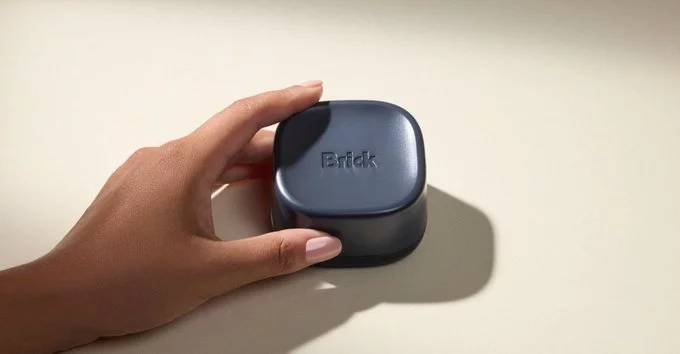
Brick Night uses Bluetooth to create location-based zones that can block selected apps on your phone. Instead of relying on a schedule alone, the system connects app limits to a physical Brick device. When your phone is within Bluetooth range of that device, the zone’s restrictions apply to the apps you selected.
This makes a Brick device a reference point for a particular place. You can set up a zone around it and choose which apps should be blocked there. The device’s Bluetooth connection helps determine whether your phone is in the zone, so the limits are tied to proximity rather than simply to a time of day.
When you move out of Bluetooth range, you leave that location-based zone, and its restrictions no longer apply in the same way. This approach lets you associate app blocking with places where you want fewer distractions. Brick Night’s zones are therefore based on the relationship between your phone and the Brick device, while the apps affected depend on the selections you make.
A Brick device acts as the physical trigger for the app limits you set. When your phone is near the Brick, its Bluetooth connection signals that you are inside a blocking zone. The apps and websites you have chosen to restrict are then blocked according to the zone’s settings. Moving away from the device takes your phone outside that zone, so proximity is what determines whether the limits apply.
To use this setup, place a Brick where you want a zone to begin, such as at home or in a workspace. You can configure the zone and select which apps or websites it should restrict. When you arrive within Bluetooth range, the Brick activates those restrictions; when you leave its range, the zone no longer applies. This lets you tie app limits to a physical location without relying only on a schedule. For example, keeping a Brick in a place where you want fewer distractions can make that location the cue to block selected apps. The device’s proximity, rather than a manual decision each time, is the signal used to trigger the blocking zone.
Brick’s Bluetooth Blocking Zones are designed to limit access to selected apps, not to impose broader restrictions on the phone. When a zone is active, the apps chosen for blocking are restricted when the device meets the zone’s conditions. Other phone functions are not described as being blocked by the zone.
This distinction matters when setting expectations: a Blocking Zone is an app limit tied to a location, rather than a general lock on the device. Users select which apps to include, so the restriction applies to those choices rather than automatically covering every app or feature. If an app is not selected for blocking, the zone does not make it part of the app restriction.
The zones therefore offer a focused way to limit access to specific apps in places where users want fewer distractions. They should not be understood as disabling the phone as a whole. The restrictions concern access to the selected apps; they do not amount to a broader phone-wide block.
Brick Night’s Bluetooth Blocking Zones are tied to your proximity to the Brick device. They are not simply schedules that block apps everywhere: the location-based restrictions apply when your phone is within Bluetooth range of a Brick. As you move away from the device and out of range, the zones no longer apply. This lets you set up app limits for a particular place, such as a study area, rather than having the same restrictions follow you throughout the day.
The zones are useful when you want a nearby Brick to define where certain apps are blocked. For example, you can leave the device in a spot where you want to stay focused, then use your phone within its Bluetooth range. The restrictions are connected to the Brick’s presence, so moving beyond that range changes whether the zone applies. Keep the device where you want the blocking zone to be, and remember that your phone needs to be close enough to connect over Bluetooth for the location-based blocking to take effect.









Comment