Alerts

-
3 minutes, 20 seconds
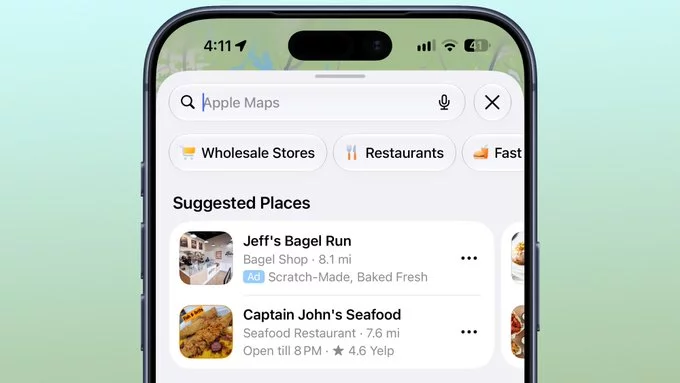
Apple has begun showing sponsored ads within Apple Maps search results, marking a significant shift in how the navigation app presents local business information. These paid placements appear as promoted listings when users search for categories like restaurants, stores, or other services, blending into the organic results at the top of the list.
Critically, there is no setting available to turn these ads off. Unlike some other platforms that offer paid tiers to remove advertising, Apple Maps currently provides no built-in toggle or preference to disable sponsored content. This means all users will encounter these promotional entries as part of their standard search experience.
The rollout represents a new revenue stream for Apple, but it changes the perceived neutrality of Maps results. Users may need to scroll past sponsored placements to reach organic, non-paid listings. For those who prefer an ad-free experience, the only current workaround involves manually ignoring the promoted results, as no opt-out mechanism exists within the app’s settings.
When you search for a business category—like “coffee” or “hotels”—Apple Maps now inserts sponsored results at the top of the list. These ads appear in the same visual format as regular organic listings, but they are clearly marked with a small “Sponsored” label beneath the business name.
This placement is designed to mimic the behavior of other popular map apps, such as Google Maps and Waze, which have long used paid placement in search results. The ad is triggered by your search query, not by your location or past behavior, so it functions purely as a keyword-based promotion.
If you tap a sponsored result, you are taken to the business’s standard Apple Maps place card, where you can see directions, call the business, or visit its website. The ad does not change the underlying map data or the business’s rating—it simply boosts its visibility in the search ranking. Apple has not yet introduced any visual distinction beyond the “Sponsored” tag, so users must look for that label to differentiate paid results from organic ones.
The most immediate change is that ads will appear before organic search results. When you search for a category like “coffee” or “hotel,” the first listing you see may be a paid placement, not necessarily the closest or highest-rated option. This can subtly influence your choices, especially if you are in a hurry and tap the first result without scrolling.
There is currently no way to disable these ads in the Maps settings. Unlike some other Apple services, you cannot turn off sponsored content entirely. This means every user will encounter them, regardless of preference. While the ads are clearly labeled, their prominent position at the top of the list gives them a distinct advantage over organic results, potentially steering users toward businesses that have paid for visibility rather than those that best match their needs.
If you prefer an ad-free navigation experience, the simplest solution is to switch to a different map application. Both Google Maps and Waze currently offer robust navigation without the sponsored placements that are beginning to appear in Apple Maps. These alternatives provide familiar features like real-time traffic updates and turn-by-turn directions, making the transition relatively seamless for most users.
For those who wish to stick with Apple’s native app, adjusting your search behavior can help minimize ad exposure. Instead of using broad, generic queries like “coffee” or “hotel,” try to be more specific in your searches. For example, typing the exact name of a business or adding a specific neighborhood or intersection to your query will often return more precise, organic results. This reduces the likelihood of sponsored suggestions appearing at the top of your list, helping you get to your intended destination without promotional distractions.










Comment