
Alerts
-
3 minutes, 27 seconds
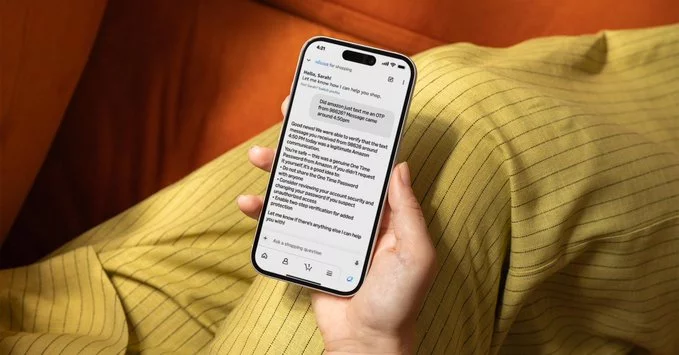
Imagine having a dedicated assistant that not only helps you manage your shopping list and track orders but also actively protects you from online scams. That’s the idea behind Alexa for Shopping, a feature designed to streamline your purchasing tasks while adding a layer of security. According to Amazon, this functionality goes beyond simple voice ordering. It can assist with a range of shopping-related activities, from reordering household essentials to comparing products. However, its most distinctive capability is its role in verifying suspicious messages. If you receive a text, email, or notification that claims to be from a retailer or delivery service but seems off, you can ask Alexa to check it. The assistant will analyze the message’s content and context to determine if it matches known legitimate communication patterns from that sender, helping you avoid phishing attempts and fraudulent links. This proactive approach turns your smart speaker into a practical first line of defense against increasingly sophisticated shopping scams. This integration of convenience and safety is what makes Alexa for Shopping a compelling addition to your daily routine.
When you receive a message that feels off, Alexa doesn’t just guess. It cross-references the suspicious content against Amazon’s complete, historical record of every message ever sent to your account. This archive includes past shopping notifications, order updates, and promotional emails from verified senders.
Alexa’s verification process works by checking whether the message’s core details—such as the sender address, the subject line, or embedded links—match any legitimate correspondence already in your Amazon history. If the suspicious message claims to be an order confirmation, Alexa scans for a matching order number or tracking ID in your actual purchase records. If no match exists, or the sender’s domain differs from Amazon’s official channels, Alexa flags it as unverified.
This method is effective because scammers often fabricate urgency by referencing past purchases. However, Alexa can only verify messages that claim to come from Amazon itself—it cannot authenticate third-party retailers or unrelated services. The system relies on your existing message history being accurate and up-to-date, so any gap in that record could reduce verification accuracy.
While Alexa’s new verification feature is a helpful safeguard, it is important to understand its boundaries. The system works by comparing incoming messages against a database of known, legitimate communications that Amazon has actually sent. This means Alexa’s analysis is inherently limited to emails, texts, or notifications originating from Amazon’s own official channels.
Consequently, the AI assistant is not designed to evaluate or flag suspicious content that comes from other sources. If a scammer impersonates a different retailer, a bank, a delivery service, or any entity other than Amazon, Alexa will not provide a warning. The feature simply lacks the reference data to make that comparison. As such, it cannot serve as a universal shield against all phishing attempts or fraudulent messages you might receive. Users should treat Alexa’s verification as a specialized tool for Amazon-specific correspondence, not as a comprehensive security solution for their entire inbox or text message history.
This feature is currently in preview and is being rolled out to select customers only. It is not yet available to the general public, and Amazon has not announced a specific date for a wider release.
To access the feature during this preview period, you can use your voice with an Alexa-enabled device. Simply say, “Alexa, ask Amazon about my messages.” This command will trigger the shopping assistant to check for any suspicious communications related to your Amazon account.
If you are among the selected users, you will receive a notification or see the option appear in your Alexa app. For those not yet included, the command may not respond as expected until the preview expands. Keep in mind that this is an early test, so functionality may evolve based on customer feedback before a full launch.









Comment