
Alerts
-
6 minutes, 6 seconds
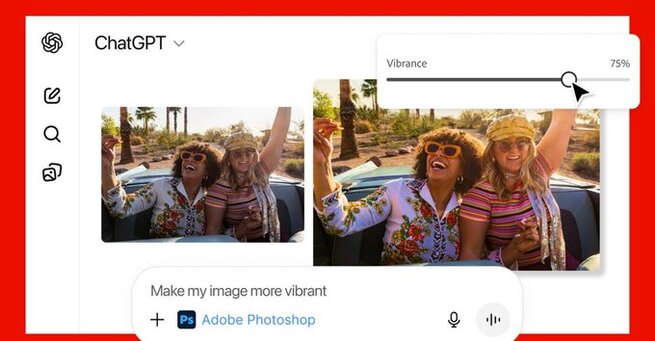
Adobe apps in ChatGPT are becoming one of the most searched updates today, as users want to know whether they can now edit photos, tweak PDFs, or design graphics without switching platforms. The short answer: yes—and it’s completely free. Adobe has officially launched embedded versions of Photoshop, Acrobat, and Adobe Express inside ChatGPT, letting anyone edit images or documents simply by describing what they want. This upgrade makes advanced editing accessible for beginners and dramatically speeds up workflows for professionals who want fast, mobile-friendly results.
The new Photoshop app for ChatGPT lets users perform photo edits using natural language commands, making tasks like blurring backgrounds or enhancing lighting far more intuitive. Instead of opening desktop software, users can upload an image and type something like, “Photoshop, increase contrast and brighten the subject.” ChatGPT remembers the active app, so follow-up edits don’t require re-typing the name. Some requests surface interactive UI elements, including familiar sliders for exposure, brightness, and contrast, giving users fine control without feeling overwhelmed. It's not full Photoshop, but it covers the most popular features that everyday users need.
PDF editing is one area where users frequently search for free alternatives—and Adobe is now offering one directly through ChatGPT. The Acrobat app inside ChatGPT can edit existing PDFs, compress large files, extract tables or paragraphs, convert documents into PDF format, and even merge multiple files. Users can highlight specific document sections to modify or simply describe changes, such as “remove page two” or “extract the table from page five.” The combination of conversational instructions and Acrobat’s precision tools makes PDF management faster than typical browser-based editors.
For creators, marketers, and students, Adobe Express in ChatGPT brings a powerful design engine into the chatbot. Users can generate posters, invitations, social media graphics, or thumbnails by describing their style, colors, and messaging. Every element—images, fonts, animations, and layout—can be customized directly inside the chat. Express also supports creative effects and animated transitions, allowing users to build visually polished designs without toggling between apps. If deeper editing is needed, projects can be seamlessly exported into the native Adobe Express app for more advanced adjustments.
One of the biggest advantages of Adobe’s integration is that users no longer need to know which tool handles which task. Instead of learning Photoshop menus or Acrobat layers, they can simply explain the result they want. ChatGPT automatically routes the request to the appropriate Adobe app and offers multiple output options when available. The experience feels conversational, approachable, and significantly more mobile-friendly—key reasons this integration is likely to trend on Google Discover and social media feeds.
Adobe clarifies that these ChatGPT apps don’t replicate every capability of desktop Photoshop or Acrobat, but they deliver the core features most users rely on daily. That includes selective edits, creative filters, exposure adjustments, PDF cleanup tools, and multi-file merging. For many people, the ChatGPT interface may be even more convenient because it removes complexity, reduces workflow steps, and delivers fast previews inside a single conversation.
While ChatGPT offers a streamlined editing experience, it also integrates with Adobe’s ecosystem. Any project started in ChatGPT—whether a photo edit, a design, or a PDF—can be exported into Adobe’s native apps. This gives creatives the flexibility to begin with simple AI-assisted edits, then finish with full professional tools when needed. The result is a balanced workflow that caters to both casual users and power editors.
This rollout marks one of Adobe’s biggest moves toward conversational, AI-powered creativity. By placing Photoshop, Acrobat, and Express inside ChatGPT, Adobe is signaling a future where professional tools are guided by natural language rather than complex menus. For users, it means faster edits, fewer app switches, and accessible creativity—right inside a chatbot they already use daily.








Comment