
Alerts
-
3 minutes, 24 seconds
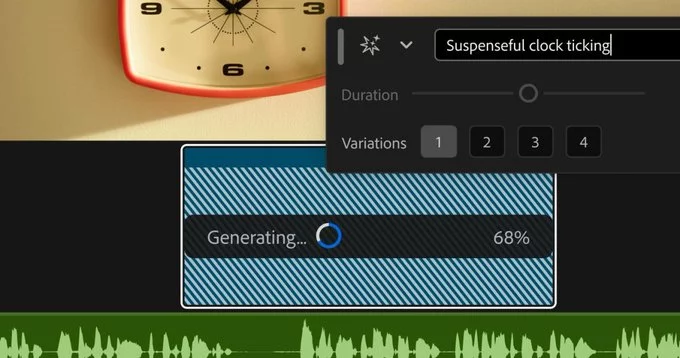
Generative media is no longer a separate, isolated step in your creative process. We have introduced a dedicated Generative Media interface that is now available directly from the project timeline. This means you can access the full suite of AI-driven asset creation tools without ever leaving your editing workspace. Instead of switching between applications or hunting through nested menus, the interface appears contextually, ready for use the moment you need it. This direct integration places the power of generative creation right at the point of assembly, ensuring that the tool is always within reach during the most critical phase of your project. By embedding this functionality into the timeline’s core structure, we have removed the friction that previously existed between conceiving an idea and placing it into your sequence. The result is a more fluid, uninterrupted editing experience where inspiration can be acted upon instantly, directly within the flow of your work. This accessibility is designed to make the technology feel like a natural extension of your existing editing habits.
Integrating Generative Media directly into the timeline eliminates the constant context-switching that plagues traditional editing workflows. Instead of exporting a clip, opening a separate AI tool, generating assets, and then re-importing the result, you can invoke the generation inline—right where your sequence is playing. This immediate access dramatically reduces friction, allowing you to iterate on an idea in seconds rather than minutes.
This streamlined approach means you spend less time managing files and tools, and more time making creative decisions. The result is a more fluid, intuitive process where Generative Media feels like a native extension of your editing suite, not an external detour. For editors facing tight deadlines, this direct integration translates directly into saved hours and a smoother path from concept to final cut.
From the timeline, you can directly select a clip or an empty track region. A contextual menu or a dedicated panel opens, presenting you with generative media options tailored to that specific timeline context. Instead of switching to a separate application, you describe the asset you need—such as a background texture or a sound effect—using a text prompt.
The system then generates the media based on your request, and it appears as a new asset within your project. Crucially, the interface handles the technical integration for you. The generated file is automatically placed back into your timeline at the exact position you selected, with the correct duration and settings aligned to your project’s parameters. This eliminates manual importing, file management, and format conversion. You can review the generated result immediately in place, and if it isn’t quite right, you can adjust your prompt or regenerate the asset without ever leaving the timeline view. This direct, in-context generation is the core of the workflow.
The direct integration of generative media into the timeline fundamentally alters the creative process by removing the friction of context-switching. Instead of generating an asset in a separate tool, exporting it, and then importing it into your project, you can now invoke the AI directly within your editing environment. This seamless integration allows for rapid iteration, as you can test multiple variations of a visual or sound effect without ever leaving the timeline.
This proximity between generation and placement encourages a more experimental and fluid workflow. Editors can treat the AI as a collaborative partner, generating placeholder content, exploring stylistic directions, or filling gaps in footage immediately at the point of need. The result is a more efficient pipeline that keeps the creative momentum going, allowing you to focus on the narrative and visual storytelling rather than on technical asset management.





Comment