Alerts

-
3 minutes, 45 seconds
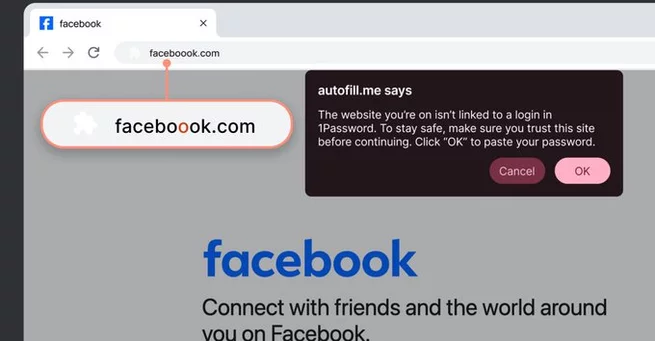
Phishing attacks are growing more sophisticated, costing businesses an average of $4.8 million per incident. To help users stay safe online, 1Password has launched a new phishing prevention feature designed to detect suspicious websites before login credentials are entered. The feature aims to alert users when a URL doesn’t match the one saved in their password manager, adding an extra layer of security for both personal and professional accounts.
Once activated, the 1Password browser extension performs two key actions when it detects a potentially dangerous website. First, it prevents automatic filling of login credentials, blocking unauthorized access. Second, it displays a clear pop-up warning stating the current URL “isn’t linked to a login in 1Password,” prompting users to verify the site before proceeding.
This approach is designed to encourage caution, making users aware of potential phishing scams without forcing strict restrictions. While it does not completely stop phishing attacks—users could still manually enter their credentials—the alerts are a proactive reminder to double-check website authenticity.
The rollout begins immediately but may take several weeks to reach all users. For individual and family plan members, the feature is automatically enabled once available. Business accounts, however, require manual activation by 1Password Admins, allowing organizations to manage security settings centrally.
Phishing attacks remain one of the most common ways cybercriminals compromise accounts. Misspelled URLs or nearly identical websites can trick even cautious users into handing over sensitive information. By integrating phishing detection directly into the password manager, 1Password provides a practical tool to reduce these risks.
Experts note that even a brief warning can change user behavior, making it less likely for employees or personal users to fall for scams. This aligns with broader trends in cybersecurity, where user awareness combined with smart technology helps prevent costly security breaches.
Although the feature is a major step forward, it’s not a complete shield. Users must remain vigilant and practice good security hygiene, such as checking website URLs and enabling two-factor authentication wherever possible. The 1Password phishing alerts serve as a timely reminder and safeguard, but awareness remains key to online safety.
With cyber threats on the rise, tools like 1Password’s phishing prevention feature are essential for everyday internet users and businesses alike. By stopping automatic logins on suspicious sites and providing real-time warnings, 1Password is helping people stay one step ahead of attackers. The new feature represents a thoughtful blend of technology and user guidance, aiming to make online accounts safer without compromising convenience.










Comment