
-
2 minutes, 17 seconds
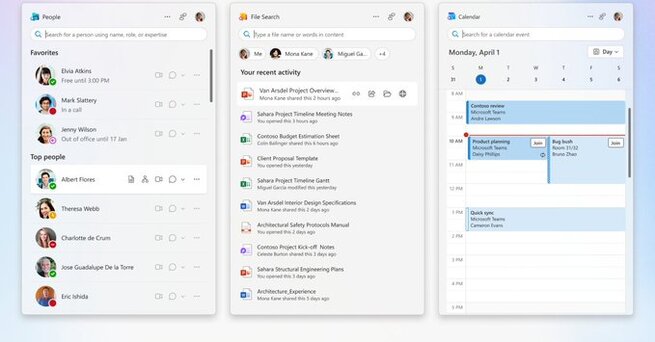
Microsoft 365 Companion Apps for Windows 11 Bring Productivity to the Taskbar
Microsoft has introduced new Microsoft 365 companion apps for Windows 11, designed to streamline productivity right from your desktop. These lightweight taskbar apps launch automatically at startup, giving business users instant access to contacts, file searches, and calendars—without opening separate programs. With their seamless integration, Microsoft 365 companion apps make managing work tasks faster, easier, and more intuitive.
Quick Access to Contacts with Microsoft 365 Companion Apps
One standout feature of the Microsoft 365 companion apps is the People companion. This tool offers a browsable organizational chart and lets you search for anyone in your company. Whether you need to start a Teams chat, initiate a call, or send an email, it’s all possible directly from the taskbar. This convenience eliminates the need to open multiple apps, helping you communicate with colleagues in seconds.
File Search Made Simple in Microsoft 365 Companion Apps
The File Search companion is another productivity boost, allowing quick access to files stored across OneDrive, SharePoint, Microsoft Teams, and Outlook. You can search by file name, author, or keywords, and even preview documents before opening them. Advanced filtering and sharing options make it easier to locate and distribute important work files, ensuring you spend less time searching and more time working.
Stay on Top of Schedules with the Microsoft 365 Calendar Companion App
The Calendar companion app provides an at-a-glance view of your schedule directly from the taskbar. You can review upcoming events, search for appointments, and join meetings with a single click. This integration makes it easy to stay organized without switching between apps, ensuring you never miss important deadlines or calls.

2.5K articles

1.4K articles

34 articles

28 articles














Comment