Alerts

-
6 minutes, 0 seconds
Spotify Snooze Button: Everything You Need to Know About This Game-Changing Feature
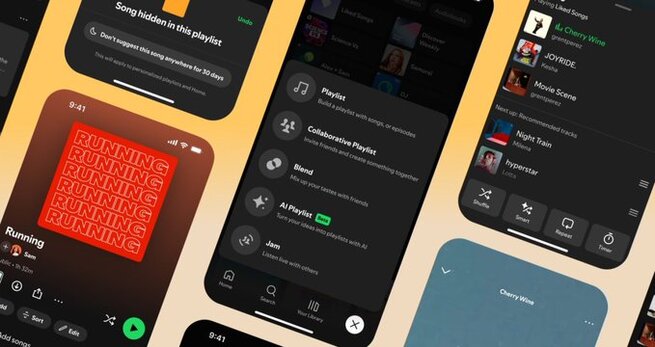
Looking for a way to stop hearing the same songs on repeat without permanently removing them from your playlists? Spotify’s new Snooze button feature is exactly what you need. Designed to give users more control over their listening experience, the Spotify Snooze button allows you to temporarily mute songs you’re getting tired of. Once snoozed, these tracks will disappear from your recommendations for 30 days, helping keep your playlists feeling fresh without losing your favorite tunes forever.
Spotify is initially rolling out the Snooze feature exclusively to Premium subscribers, with plans to expand it to all users soon. The update responds to one of the most common user frustrations — music fatigue — and signals Spotify’s commitment to delivering a smarter, more personalized listening experience.
The Spotify Snooze button is simple and intuitive. When you come across a track that you’re temporarily tired of, you can choose to “Snooze” it. This action will prevent Spotify’s recommendation algorithms from suggesting the snoozed song across your playlists for 30 days. After that period, the song will automatically reintegrate into your rotation — no manual work required.
It’s important to note that snoozing a song is different from removing or disliking it. Spotify’s recommendation system recognizes snoozing as a temporary preference, so it won’t impact your overall taste profile permanently. Whether you're commuting, studying, or working out, this feature ensures your music stays exciting without losing what you love most.
Alongside the Snooze update, Spotify has revamped its Hide button. Previously, hiding a track would only affect your current device. Now, when you hide a song, it will be hidden across all your devices, creating a more seamless and personalized experience whether you're using the Spotify mobile app or the desktop app.
This enhancement complements the Snooze feature perfectly, giving users even more ways to curate their listening environments with precision and ease.
Spotify isn't stopping with just the Snooze button. Premium subscribers are getting a major refresh to their music queue as well. The new queue design introduces easier access to shuffle, smart shuffle, repeat, and sleep timer options. Plus, after the songs in your queue finish playing, Spotify will now suggest personalized track recommendations — offering a smarter transition without dead air.
These updates aim to maximize user engagement and satisfaction, which is key for Spotify's ongoing growth strategy and crucial for improving streaming service revenue.
Managing playlists on Spotify’s mobile app has also become smoother. New Add, Sort, and Edit buttons now sit conveniently at the top of each playlist, streamlining customization. Users in the US, Canada, UK, Australia, Ireland, New Zealand, and South Africa can now quickly turn their Liked Songs into standalone playlists.
Additionally, a new Create button has been added to the bottom-right corner of the app, making it easier than ever to build playlists, join shared playlists, and even create AI-generated playlists with friends — another powerful Spotify Premium feature that boosts social engagement.
Finally, Spotify’s desktop app is receiving some love. Users can now preview songs from playlists, albums, and artists — a feature previously only available on mobile. This small but meaningful addition makes discovering new music faster and more enjoyable for desktop users, particularly valuable for those working or studying from their computers.
Absolutely. The Spotify Snooze button is a thoughtful, user-first feature that solves a real pain point — music fatigue. Along with smarter hiding options, revamped playlist management, and improved queue features, Spotify continues to enhance the experience for Premium and free users alike.
For anyone serious about their music experience, especially those who value music streaming personalization, playlist curation, and listening control, the Snooze feature is a welcome and much-needed upgrade.
As Spotify continues to innovate with AI playlists, music previews, and enhanced mobile features, it’s clear they are laser-focused on maintaining their position as the world’s leading music streaming service.










Comment