Alerts

-
3 minutes, 29 seconds
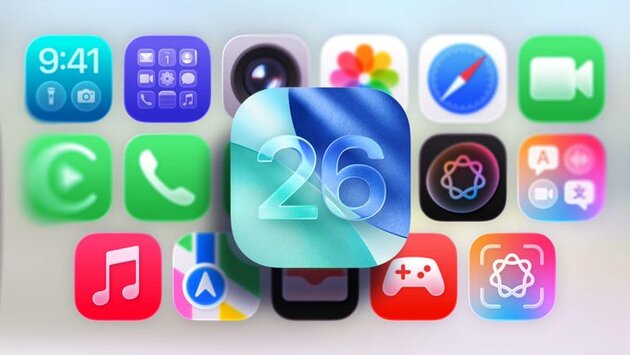
iOS 18 vs iOS 26: What Liquid Glass Means for Your iPhone
Curious how iOS 18 vs iOS 26 stack up visually and functionally? With Apple’s iOS 26 now in public beta, iPhone users are getting hands-on experience with the new “Liquid Glass” design. One of the most talked-about UI changes in recent memory, Liquid Glass introduces a sleeker, semi-translucent aesthetic that stands out—but also subtly blends into your everyday experience. If you're wondering how this compares to the familiar layout of iOS 18, you're not alone. Let’s break down what’s changed, what hasn’t, and what Liquid Glass could mean for your next iPhone update.
Visual Experience in iOS 26 with Liquid Glass
Liquid Glass gives iOS 26 a glossy, modern interface that feels both fresh and familiar. It softens edges, adds depth to app windows, and introduces fluid motion animations that enhance the overall user experience. While it might seem like a huge shift from iOS 18 at first glance, longtime iPhone users will still recognize the layout and core navigation elements. Apple hasn’t completely overhauled the system—it’s more of a visual polish that modernizes iOS without alienating users. Think of it as giving your iPhone a coat of invisible shine that makes everything pop just a bit more.
Functionality: Subtle but Smarter Changes
Although most of the attention is on the visuals, iOS 26 vs iOS 18 shows us that Apple hasn’t ignored functionality. Notifications are now smarter and more context-aware, and the new Control Center redesign offers quicker access to key features. Small usability upgrades make daily interactions smoother, such as quicker toggles for Wi-Fi or Focus modes. Importantly, despite the visual changes, iOS 26 remains optimized even for older iPhones, so you’re not sacrificing speed for style. It feels like Apple’s refining the iPhone experience rather than reinventing it.
What to Expect Before the Final Release
As of now, iOS 26 is still in public beta, which means tweaks and refinements are ongoing. Apple is actively adjusting contrast levels, transparency effects, and system icons to ensure both accessibility and aesthetics. If you’re still using iOS 18, expect a more polished and responsive interface once iOS 26 becomes official—likely with the iPhone 17 launch. For developers and curious early adopters, the current beta is a good glimpse into Apple’s next design chapter. But for most users, the biggest question is: Will Liquid Glass feel better or just look better?








Comment