Alerts

-
4 minutes, 46 seconds
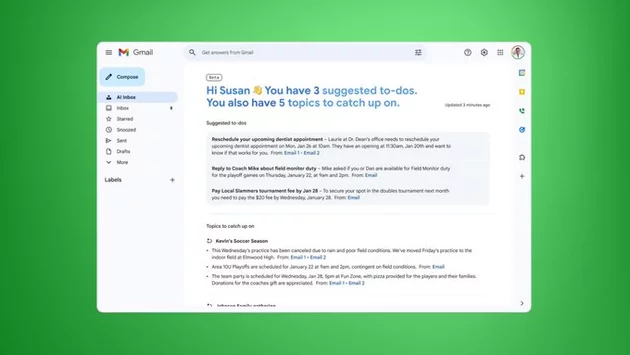
Google is stepping up its email game with Gemini 3-powered AI features in Gmail. Users can now summarize long email threads in seconds and interact with their inbox through smart questions. Google’s new approach prioritizes emails based on frequent contacts and context inferred from message content, making it easier to focus on what matters most. With these updates, Gmail aims to save users time, reduce inbox clutter, and enhance productivity across both personal and professional communications.
The highlight of Gmail’s Gemini AI rollout is the AI Overviews tool. Lengthy email threads can now be condensed into digestible summaries, letting users grasp key points at a glance. Instead of scrolling endlessly or hunting for critical details, AI Overviews provides a concise snapshot of conversations. Users can also ask Gemini questions about specific emails or threads, creating a more interactive and personalized email experience. This innovation promises to cut down email management time dramatically, especially for professionals juggling multiple projects.
Google’s Help Me Write tool offers AI-assisted email creation for all users. By typing a prompt, users can generate polished emails instantly or improve drafts that already exist. The tool is particularly useful for busy professionals who need to maintain a professional tone while saving time. Whether it’s writing a quick follow-up or crafting a detailed proposal, Help Me Write ensures emails are coherent, concise, and ready to send with minimal effort.
Another free feature, Suggested Replies, analyzes your writing style to provide contextually relevant responses. Instead of relying on generic pre-written replies, Gmail now tailors suggestions that feel natural and aligned with your tone. This feature is ideal for managing high-volume inboxes, allowing users to reply faster without compromising authenticity. By learning from patterns in previous emails, Suggested Replies becomes smarter over time, enhancing communication efficiency.
For those on Google AI Pro and Ultra plans, Gmail offers Proofread, a sophisticated tool that checks grammar, tone, and style before sending emails. It ensures professional and polished communication, whether drafting business proposals or client updates. Proofread integrates seamlessly into the Gmail interface, giving subscribers confidence that their messages are clear, accurate, and impactful. This tiered approach caters to casual users while providing advanced functionality for professionals who rely heavily on email.
By combining AI Overviews, Help Me Write, Suggested Replies, and Proofread, Gmail is positioning itself as a productivity powerhouse. Users no longer need to waste hours reading, drafting, or correcting emails. Gemini AI adapts to individual habits, learning from contacts and communication style to optimize workflow. This approach reflects a broader trend in AI-driven productivity tools: making digital communication faster, smarter, and more human-like. Gmail’s AI enhancements could redefine how individuals and businesses approach email in 2026 and beyond.
Users can access most of these AI tools immediately within Gmail. Free features like AI Overviews, Help Me Write, and Suggested Replies are available to all, while Proofread requires a subscription to Google AI Pro or Ultra. As more people adopt these tools, managing emails is likely to become significantly easier, more intuitive, and far less time-consuming. For anyone overwhelmed by inbox chaos, Gmail’s Gemini AI era promises a welcome reprieve.










Comment